If you run Nexus 9300s, you have asked it. Choosing Nexus 9300 compatible optics should be a two-minute job, and it never is — because Cisco splits the answer across a datasheet, a hardware installation guide, an interfaces configuration guide and a compatibility matrix that only works in a browser. Nobody has all four open at once.
So here it is in one place: what each model takes, the Carritech Optics part against each Cisco part number, and the coding notes — because that is where most of the surprises actually live, and almost none of them are where people expect.
[image: Nexus 9300 compatible optics — Cisco part numbers alongside Carritech Optics equivalents]
Nexus 9300 compatible optics start with the cage, not the model
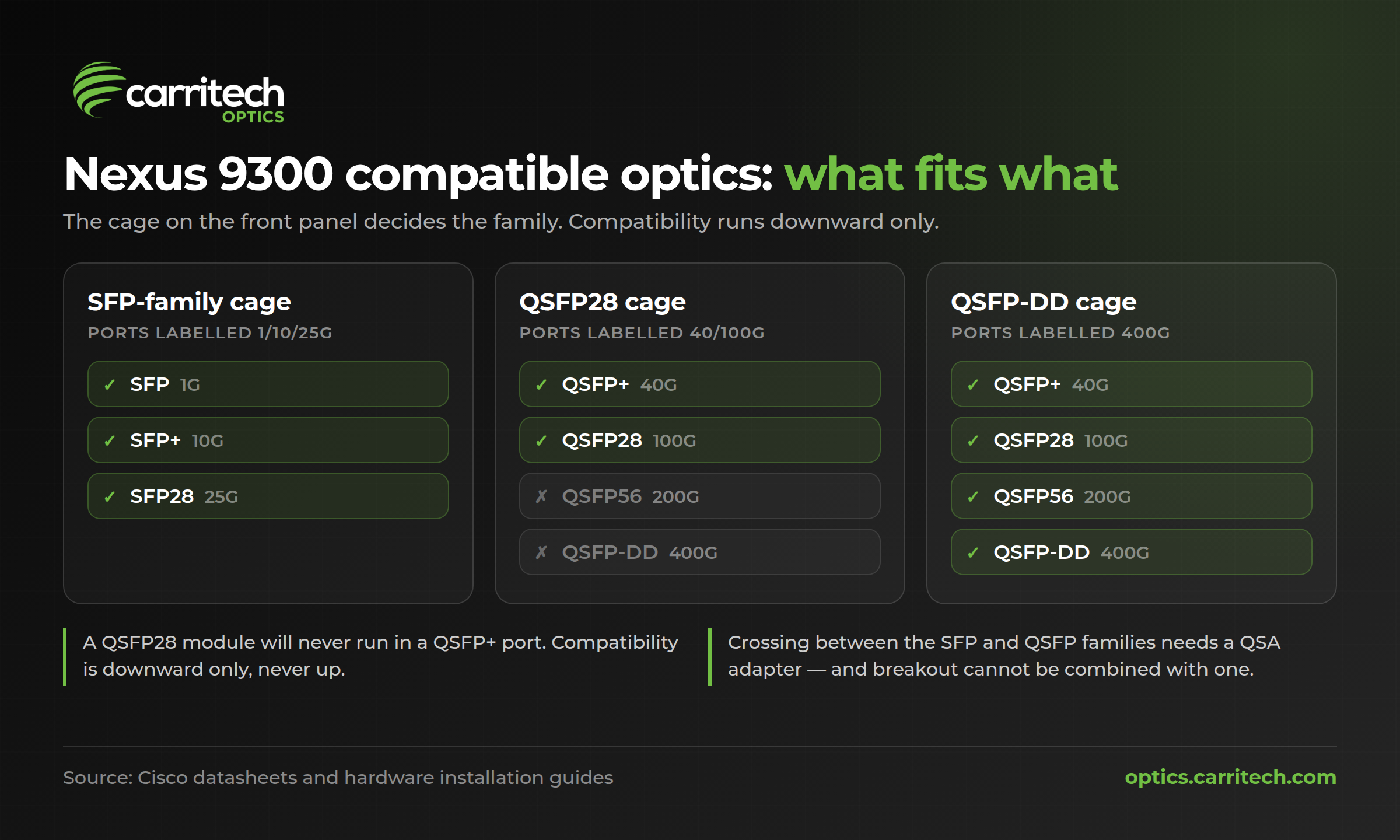
Front-panel cages come in two families, and each family is backwards compatible downward only.
En SFP family covers SFP (1G), SFP+ (10G) and SFP28 (25G). They are physically the same cage. A port labelled 1/10/25G takes any of the three; you set the speed per port.
En QSFP family covers QSFP+ (40G), QSFP28 (100G), QSFP56 (200G) and QSFP-DD (400G). The Ethernet standards these speeds implement are set by the IEEE 802.3 working group, not by any switch vendor \— which is why a compliant optic is a compliant optic whoever built it. A QSFP-DD port takes QSFP+, QSFP28 and QSFP56 modules — Cisco states this outright in the 400G QSFP-DD transceiver datasheet, and repeats it in the GX2 switch datasheet, which lists the QSFP-DD ports as supporting 400G, 200G, 100G and 40G. A port Cisco labels “40/100G QSFP28” takes a 40G QSFP+ module for the same reason.
The reverse never works. A QSFP28 module will not run in a QSFP+ port, and a 25G SFP28 module will not run at 25G in a 10G-only cage.
[image: Nexus 9300 compatible optics cage compatibility chart showing which module fits which port]
Crossing between the two families needs a QSA adapter. There are two:
| Adapter | Converts | Enables |
| CVR-QSFP-SFP10G | QSFP+ port to SFP/SFP+ | 1G and 10G |
| CVR-QSFP28-SFP25G | QSFP28 port to SFP28/SFP+/SFP | 1G, 10G and 25G |
Cisco documents these in the 40GBASE QSFP modules datasheet and the 100GBASE QSFP modules datasheet respectively.
Two things to know before you plan around a QSA. Since NX-OS 7.0(3)I7(2), manual breakout of a QSA port is not supported — you cannot have both on the same port. And on the 9336C-FX2, 1G over QSA is barred on ports 1–6 and 33–36 specifically. That exclusion is printed in the FX2 datasheet and it catches people out, because those are exactly the ports at each end of the panel that get used for odd jobs.
Nexus 9300 compatible optics by model
| Model | Downlinks | Uplinks |
| 93180YC-EX | 48 × 1/10/25G SFP28 | 6 × 40/100G QSFP28 |
| 93180YC-FX | 48 × 1/10/25G SFP28 | 6 × 40/100G QSFP28 |
| 93180YC-FX3 | 48 × 1/10/25G SFP28 | 6 × 40/100G QSFP28 |
| 93108TC-EX / FX / FX3 | 48 × copper RJ-45 | 6 × 40/100G QSFP28 |
| 93240YC-FX2 | 48 × 1/10/25G SFP28 | 12 × 40/100G QSFP28 |
| 93360YC-FX2 | 96 × 1/10/25G SFP28 | 12 × 40/100G QSFP28 |
| 9336C-FX2 | 36 × 40/100G QSFP28 | — |
| 9332C | 32 × 40/100G QSFP28 | 2 × 1/10G SFP+ |
| 9364C | 64 × 40/100G QSFP28 | 2 × 1/10G SFP+ |
| 9316D-GX | 16 × 400/100/40G QSFP-DD | — |
| 93600CD-GX | 28 × 40/100G QSFP28 | 8 × 400/100G QSFP-DD |
| 9364C-GX | 64 × 100/40G QSFP28 | — |
| 9332D-GX2B | 32 × 400G QSFP-DD | 2 × 1/10G SFP+ |
| 9348D-GX2A | 48 × 400G QSFP-DD | 2 × 1/10G SFP+ |
| 9364D-GX2A | 64 × 400G QSFP-DD | 2 × 1/10G SFP+ |
The per-model detail that changes what you order:
93180YC-EX and 93180YC-FX. The 48 downlinks genuinely do 1G. Cisco’s hardware installation guides for the 93180YC-EX and the 93180YC-FX both say the ports “support 1-Gigabit, 10-Gigabit, and 25-Gigabit Ethernet”. You need a 1G SFP module and a per-port speed setting — no QSA, no adapter, because these are already SFP-family cages. The FX adds 8/16/32G Fibre Channel on the same ports, under a feature licence, and wire-rate MACsec on all ports. The EX went end-of-sale in August 2022 with support running to August 2027; Cisco’s stated replacement is the FX3.
93180YC-FX3. Cisco’s FX3 datasheet and its hardware installation guide disagree about the downlinks — the datasheet says 1/10/25G, the installation guide says 100M/1/10/25G. If you are planning a 100M connection on this platform, verify on your own switch rather than on either document. The installation guide also carries a note worth reading twice before you order: auto-negotiation is not supported at 10G on ports 1–48, or on ports 49–52 with a QSA.
93108TC family. The 48 front ports are RJ-45 copper and take no pluggable optic at all. The six QSFP28 uplinks are the only ports you buy transceivers for. The FX3P variant adds 2.5G and 5G multigigabit plus PoE on the copper ports.
93240YC-FX2 and 93360YC-FX2. On the 93360YC-FX2 the 12 uplinks are numbered 97–108 and they are the only ports that break out. The 93240YC-FX2 installation guide notes that its 12 uplinks can be configured as downlinks, and carries a specific restriction: 10/25G-LR-S with QSA was not supported in Release 14.0(1).
9332C and 9364C. These are the ones that catch people. The datasheet says, in as many words, “Breakout cables are not supported” — and both models are absent from the NX-OS breakout support matrix entirely. If your design assumed 4 × 10G fan-out from a 9332C, it does not work. They are 40G and 100G only, and the range of Nexus 9300 compatible optics for them is correspondingly narrow.
9336C-FX2. All 36 ports break out, and all 36 do 1/10/25/40/100G — except for the 1G-over-QSA exclusion on ports 1–6 and 33–36 noted above. The FX2-E variant adds 16/32G Fibre Channel.
The GX generation. En 9316D-GX breaks out on all 16 ports. The 93600CD-GX is the awkward one: ports 1–24 do 2 × 50G on any port but 4 × 10G and 4 × 25G on odd-numbered ports only, ports 25–28 do all modes, and the eight QSFP-DD ports 29–36 add 4 × 100G. Cisco’s quad-group rule applies across the platform — only one speed can be active in a quad group at a time, and breaking one port out to 4 × 25G or 4 × 10G automatically removes the even ports in that quad. The 9364C-GX follows the same odd-ports-only pattern.
The GX2 generation. All three — 9332D-GX2B, 9348D-GX2A, 9364D-GX2A — take 400G QSFP-DD natively and accept QSFP56, QSFP28 and QSFP+ in the same cages. Every port supports 4 × 10G, 4 × 25G, 4 × 50G, 4 × 100G and 2 × 200G breakout. MACsec coverage differs by model: the last 8 ports on the 9332D-GX2B, all 48 on the 9348D-GX2A, the first 16 on the 9364D-GX2A.
Nexus 9300 compatible optics by speed
Every Carritech part below is cross-referenced to the Cisco part number in our own catalogue, and every one is coded to order for the platform it is going into.
10G SFP+ — the 48 downlinks on any YC model, or a QSFP port with a QSA
| Cisco | Carritech | Reach and media |
| SFP-10G-SR-S | CT-SFP+SR | 300 m multimode, duplex LC |
| SFP-10G-LR-S | CT-SFP+LR | 10 km single-mode, duplex LC |
| SFP-10G-ER-S | CT-SFP+ER | 40 km single-mode, duplex LC |
| SFP-10G-ZR-S | CT-SFP+ZR | 80 km single-mode, duplex LC |
| SFP-10G-BXU-I | CT-SFP+BX-10U | 10 km BiDi, single fibre |
| SFP-10G-T-X | CT-SFP+T-30 | 30 m Cat 6A copper, RJ-45 |
| CWDM-SFP10G-nnnn | CT-SFP+CWXX-80 | 80 km CWDM, eight wavelengths |
| DWDM-SFP10G-nn.nn | CT-SFP+DWXX-80 | 80 km DWDM, fixed channel |
| DWDM-SFP10G-C | CT-SFP+TDWXX-80 | 80 km DWDM, tunable |
[image: CT-SFP+SR 10GBASE-SR transceiver, one of the Nexus 9300 compatible optics in this guide]
BiDi runs in matched pairs — an upstream module at one end, a downstream module at the other. We carry both halves from 3 km to 100 km, so if you are running out of fibre rather than out of ports, that is the range to look at.
25G SFP28 — the FX and FX3 downlinks
| Cisco | Carritech | Reach and media |
| SFP-25G-SR-S | CT-SFP28-SR | 70 m OM3, 100 m OM4 |
| SFP-10/25G-LR-S | CT-SFP28-LR | 10 km single-mode |
| SFP-25G-ER-I | CT-SFP28-ER | 40 km single-mode |
25G BiDi pairs are available from 20 km to 80 km. Read the FEC section below before you order anything 25G — it is the single most common reason a 25G link does not come up, and it has nothing to do with who made the optic.
40G QSFP+ — any port Cisco labels 40/100G
| Cisco | Carritech | Reach and media |
| QSFP-40G-SR4-S | CT-QSFP+SR4 | 100 m OM3, 150 m OM4, MPO |
| QSFP-40G-LR4-S | CT-QSFP+LR4 | 10 km single-mode, duplex LC |
| QSFP-40G-SR-BD | CT-QSFP+SRBD | 100 m OM3, 150 m OM4, duplex LC |
The BiDi part is worth a second look. Standard 40G SR4 needs an MPO trunk and eight fibres. The BiDi module runs 40G over the same two-fibre duplex LC multimode patch you already have in place for 10G. If the cost of a 40G upgrade in your building is really the cost of re-cabling, that part number is the one that removes it.
100G QSFP28
| Cisco | Carritech | Reach and media |
| QSFP-100G-SR4-S | CT-QSFP28-SR4 | 100 m OM4, MPO |
| QSFP-100G-LR4-S | CT-QSFP28-LR4 | 10 km single-mode, duplex LC |
| QSFP-100G-CWDM4-S | CT-QSFP28-CWDM4 | 2 km single-mode, duplex LC |
| QSFP-100G-PSM4-S | CT-QSFP28-PSM4 | 2 km single-mode, MPO |
| QSFP-100G-ER4L-S | CT-QSFP28-ER4-L | 30 km, or 40 km with FEC |
| QSFP-100G-ZR4-S | CT-QSFP28-ZR4 | 80 km single-mode |
| — | CT-Q40/100-SRBD | 70 m OM3, 100 m OM4, duplex LC |
That last one is the 100G equivalent of the 40G BiDi argument, and it is dual-rate: it runs 40G or 100G over duplex multimode. On a 9336C-FX2 or a 9364C sitting on existing OM4 duplex, it is the part that avoids an MPO re-cable.
400G QSFP-DD — GX and GX2 models
| Cisco | Carritech | Reach and media |
| QDD-400G-SR8-S | CT-400G-QDD-SR8 | 70 m OM3, 100 m OM4 |
| QDD-400G-SR4.2-BD | CT-400G-QDD-SR4 | Short reach multimode |
| QDD-400G-DR4-S | CT-400G-QDD-DR4 | 500 m single-mode |
| QDD-400G-FR4-S | CT-400G-QDD-FR4 | 2 km single-mode, duplex LC |
| QDD-400G-LR4-S | CT-400G-QDD-LR4 | 10 km single-mode, duplex LC |
| QDD-400G-LR8-S | CT-400G-QDD-LR8 | 10 km single-mode |
| QDD-400G-ER4-S | CT-400G-QDD-ER4 | 40 km single-mode |
| QDD-2X100-SR4-S | CT-200G-QDD-2SR4 | 100 m multimode, 2 × 100G |
Coding notes for Nexus 9300 compatible optics
This is the part people get wrong, in both directions. The folklore says a Nexus rejects third-party optics outright. It also says there is a magic command that fixes it. Neither is true, and the thing that actually breaks links is something else entirely.
What “coding” means
Every pluggable optic carries an EEPROM the switch reads on insertion. For SFP and SFP+ it is defined by SFF-8472, one of the SFF specifications now maintained by SNIA: a serial-ID page at address A0h holding vendor name, vendor OUI, part number, revision, serial number and date code, and a diagnostics page at A2h holding live temperature, voltage, bias, transmit power and receive power with their alarm and warning thresholds. QSFP+ and QSFP28 use SFF-8636, which puts the same identity fields in upper page 00h and reserves a 32-byte vendor-specific block at the end of it. QSFP-DD and the 400G generation use CMIS, the common management interface specification adopted by the OIF.
Alongside those standard fields, Cisco writes its own identifier. Cisco names the mechanism in its 10GBASE SFP+ datasheet: a “Cisco quality Identification (ID) feature” that “enables a Cisco platform to identify whether the module is certified and tested by Cisco”. The layout has never been published.
That is the whole of it. Coding is EEPROM contents — identity data, not optics. The same physical module coded for Cisco satisfies a Nexus; coded for Arista it satisfies an Arista. Nothing about the laser, the receiver or the reach changes. This is why a supplier asks which switch the optic is going into, and why the answer matters more than it sounds like it should. It is also the single biggest practical difference between Nexus 9300 compatible optics that work first time and ones that sit in a port doing nothing.
What NX-OS actually does with an optic it does not recognise
It warns. It does not block.
There are three separate messages in the ETHPORT facility, and they are not synonyms:
- %ETHPORT-3-IF_UNSUPPORTED_TRANSCEIVER: Transceiver on interface Ethernet1/5 is not supported
- %ETHPORT-4-IF_NON_QUALIFIED_TRANSCEIVER: Non-qualified transceiver on interface Ethernet1/5 was detected
- %ETHPORT-3-IF_NON_CISCO_TRANSCEIVER: Non-Cisco transceiver on interface Ethernet1/18 is detected
Cisco’s own bug record covering the first two, on a Nexus 9000, records the workaround as: the issue “is cosmetic in nature as switch detects the SFP okay and interface also comes up okay.”
This is genuinely different from classic IOS, where an unrecognised GBIC err-disables the port. The IOS mental model does not transfer to NX-OS, and a lot of advice written for one gets applied to the other.
One correction worth making while we are here: “SFP validation failed” is not the third-party optic error. Cisco documents that message with two causes, neither of which is vendor coding — a 1G SFP inserted into a port whose speed has not been set to 1000, and a fabric extender transceiver in a port that is not in fex-fabric mode.
service unsupported-transceiver on NX-OS
The command exists. It is in Cisco’s published Nexus 9000 configuration command reference from 7.0(3)I6 through 10.4 at least, in global configuration mode, described as “Configure support for transceivers not supported by Cisco”.
What it does on NX-OS is undocumented. No Nexus 9000 configuration guide, release note or feature document describes its behaviour, and engineers reporting from 9300-series hardware describe it as accepted by the parser but without observable effect and not persisted to the running configuration. On IOS-XE the equivalent command has a real job — suppressing err-disable — and Cisco documents the full procedure. On NX-OS there is no equivalent enforcement to suppress, which is probably why there is nothing to document.
Short version: you do not need it, and you should not plan around it working.
The one that actually bites: FEC at 25G
If a 25G link will not come up with a third-party optic, this is almost always why — and the failure gives you no clue that the optic is involved.
Nexus 9000 switches auto-select a forward error correction setting based on the product identifier read out of the transceiver’s EEPROM. That is Cisco’s own explanation, given by a Cisco engineer on a 93180YC-FX case. FEC must match at both ends or the link stays down.
Follow that through. The PID is coding. An optic coded correctly for the platform presents a PID the switch recognises, gets the right FEC default, and comes up. An optic that is uncoded, or coded for a different vendor, presents a PID the switch does not recognise, falls back to whatever default applies, and if that does not match the far end the link stays down — logging nothing about the transceiver at all. The engineer sees a dead port and starts looking at fibre. Getting the coding right is the whole job when you buy Nexus 9300 compatible optics, and it is the reason we ask which switch a part is going into.
Three related facts from Cisco’s interfaces configuration guide, all of which cause the same symptom:
- Auto-negotiation on 25G interfaces is disabled by default.
- Copper-based 25G transceivers require auto-negotiation.
- Auto-negotiation is not supported on 25G breakout ports.
Cisco also publishes a FEC-by-cable-length table for 25G copper. On the 93180YC-EX: no FEC at 1 m and 2 m, FC-FEC at 3 m and 5 m. On the 93180YC-FX and 93240YC-FX2 the 5 m entry becomes RS-IEEE rather than FC-FEC. The -EX generation does not support RS-FEC at all — the parser accepts the keyword and the hardware rejects it with a FEC validation error.
The keyword set differs by platform and release. Run fec ? on the interface rather than trusting any article, this one included. And when you are linking a Nexus to a different vendor’s switch, or to a Catalyst, set FEC explicitly at both ends rather than leaving either on auto — the same scheme has different keyword names across operating systems, and auto on one side with off on the other is a documented way to take a link down.
Checking what is actually in the port
show interface ethernet 1/1 transceiver details
The output separates cleanly into two halves, and the split is the whole story of coding. The first half — name, part number, revision, serial number, nominal bitrate — is the standard SFF vendor data every compliant optic carries. The second half — cisco part number, cisco product id, cisco vendor id, cisco id, cisco extended id number — comes from Cisco’s proprietary block. Correctly coded Nexus 9300 compatible optics populate both. That cisco product id field is the one the switch reads to pick a FEC default.
Below those, details prints the digital diagnostics table: temperature, voltage, transmit bias current, transmit power and receive power, each against its high and low alarm and warning thresholds, with ++, +, — and – markers on anything out of range. That is your optical budget, live, per port.
From NX-OS 10.6(1)F there is also show interface ethernet 1/1 transceiver vdm — versatile diagnostic monitoring, which extends beyond standard DOM to signal-to-noise ratio, pre-FEC bit error rate and laser ageing. Cisco is explicit that it depends on the module’s vendor and firmware, so treat it as a bonus rather than an expectation.
If diagnostics come back as not implemented, that points at the optic’s A2h implementation or its coding. It is not an NX-OS policy that hides DOM from third-party modules — there is no such policy documented, and a properly coded compatible optic reports DOM normally.
Do Nexus 9300 compatible optics affect your Cisco support?
Worth reading Cisco’s real position rather than either the sales version or the scare version. From Cisco’s Non-Entitlement Policy:
“When You report a product fault or defect and Cisco believes the fault or defect can be traced to the use of third-party memory products, cables, interface components, filters, or other non-Cisco authorized components by You or a reseller, then, at Cisco’s discretion, Cisco may withhold support under warranty or a Cisco support program.”
That is causation-based and discretionary. It does not say the switch warranty is void, and it does not say TAC will refuse to open a case. What it does mean in practice is that if you raise a case on a port with a third-party optic in it, you should expect to be asked to eliminate the optic as a variable. Keeping two or three genuine modules on the shelf as a swap kit is the pragmatic answer, and it is what most operations teams running mixed estates already do.
Where to verify Nexus 9300 compatible optics
This guide is assembled from Cisco datasheets, hardware installation guides and NX-OS configuration guides, and from our own catalogue data. Two honest caveats.
Per-optic, per-platform, per-release support is authoritative only in Cisco’s Optics-to-Device Compatibility Matrix. If a link is going into production, check it there.
And a few things Cisco does not publish clearly, which we are not going to guess at: the breakout port ranges on the 48-port-plus-6 models are confirmed as supported but never stated as port numbers; the 93180YC-FX3 does not appear in the breakout support matrices we could read; and the 93240YC-FX2’s breakout port range is not documented anywhere we could find. If your design depends on any of those, confirm on the switch.
Check a part number
If you have a Cisco part number in front of you, the fastest route to Nexus 9300 compatible optics is not this page — it is the compatibility checker. Type or paste the part number and it returns the Carritech equivalent, the specification, and whether it is a direct match. You can also browse the full range by form factor and speed. No form, no account, no waiting on a quote.
Or search by switch model instead, and get every optic that fits it:
When you do ask us for a quote, six things get you a right-first-time answer: the switch model, the NX-OS release, the port and the speed you need on it, the fibre type and distance, whether the port is breaking out or using a QSA, and what is on the far end. The last one matters more than people expect — at 25G and above, the far end decides your FEC.