
Most people track the end-of-life date on the switch. Almost nobody tracks it on the optic — and the optic usually runs out first.
That is not a criticism of anyone. It is a scheduling reality that follows directly from how vendors manage product lifecycles, it is fully published, and once you have seen it you can plan around it in about an hour. Here is how it works and how to check your own estate.
Two clocks, set independently
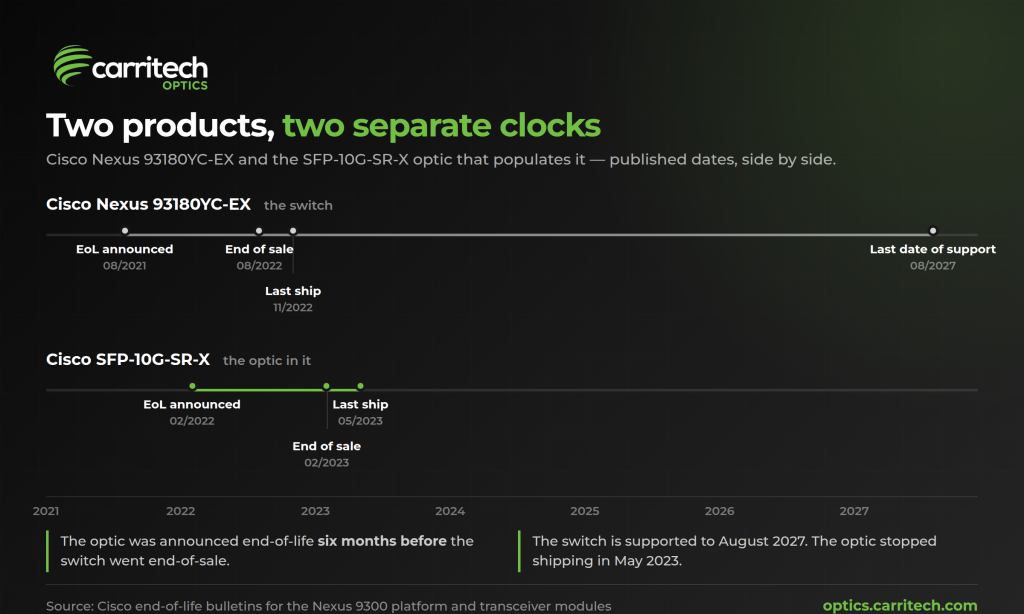
Take a real pair.
Les Cisco Nexus 93180YC-EX was announced end-of-life on 9 August 2021. End-of-sale followed on 9 August 2022, last ship on 8 November 2022, and the last date of support runs to 31 August 2027. If you bought one in 2022, you have a switch that is supported for another year yet.
Now take an optic you might well have put in it. The SFP-10G-SR-X was announced end-of-life on 14 February 2022 — six months before the switch went end-of-sale. Its own end-of-sale was 14 February 2023, and it stopped shipping on 16 May 2023.
So the switch is supported until August 2027, and the optic you populated it with stopped being orderable in May 2023. Those are two separate bulletins with two separate schedules, and nothing in the process ties them together.
This is not a Cisco quirk. Optics are a product line in their own right, with their own roadmaps, their own component supply and their own refresh cycles. Cisco maintains a dedicated end-of-life listing for transceiver modules that runs to roughly eighty notices since 2007 — a steady drumbeat entirely independent of the switch bulletins most people watch.
What the lifecycle actually commits to
Cisco’s end-of-life policy is clear and worth reading properly, because it is more generous than people assume in one respect and more limited in another.
The commitment is:
“Five (5) years of replacement parts for hardware from the EOS date, in accordance with Cisco’s Return Materials Authorization (RMA) process.”
Alongside that: five years of TAC support from end-of-sale, one year of routine failure analysis, one year of bug fixes and maintenance releases, and nothing extending past the last date of support.
The other vendors run comparable windows. Juniper’s policy puts typical end-of-support five years after the last order date. Arista’s five-year policy gives hardware replacement or repair to five years post-end-of-sale with a valid contract. HPE says support is “generally 5 years from the End of Sale date”, with the caveat that it “may reduce or extend this timeframe”.
Here is the distinction that matters. All four commit to repairing or replacing an existing part under a support contract for a defined window. None of them commits to continued availability of new optics for the supported life of the host switch. Cisco’s five-year replacement-parts figure is the only explicit parts-availability commitment we found across the four policies — and replacement parts under RMA is a different thing from being able to order forty more for a new rack.
That gap is where the planning problem lives. Your switch is supported. Your optic is supported. Neither of those facts means you can buy another one.
Three ways this shows up
You need to grow a deployment that is already built. The switch is in warranty and running fine. You want twelve more ports lit. The optic that populates the other thirty-six went last-ship eighteen months ago. Now you are either mixing a different optic into a homogeneous deployment, or sourcing from remaining channel stock at whatever it costs, or bringing the refresh forward.
You have a failure and no spare. RMA covers you if the failed unit is in support and you have a contract. It does not cover you if you consumed your spares six months ago and cannot replace the pool.
You inherit an estate. Someone else specified it, three years ago, and nobody has looked at an optics bulletin since. This is the common one, and it is the one worth spending an hour on this week.
How to check your own estate
Genuinely an hour’s work, and it is the same process on any vendor.
Get the list. On NX-OS, show interface transceiver across the estate gives you the vendor part number in every populated port. Every platform has an equivalent. Deduplicate it — most estates run five to fifteen distinct optic part numbers, not fifty.
Check each one against the vendor’s optics end-of-life listing, not the switch listing. For Cisco that is the transceiver module notice listing. You are looking for two dates: last ship, after which nobody can order it new, and last date of support, after which the vendor’s obligations end.
Sort into three buckets. Already past last ship — act now. Last ship inside eighteen months — plan now. Everything else — diarise a re-check in a year.
Write down what you find, with the dates, somewhere that survives the person who did the checking. The single most common version of this problem is that somebody knew, and then changed jobs.
Sizing spares when the clock is running
If an optic is heading for last ship, the obvious answer is to buy enough spares now. The awkward question is: how many?
We went looking for a published norm — spares per deployed port, spares per switch, anything from a vendor design guide, a standards body or an analyst. There isn’t one. The most substantial public work on optical failure rates is Meta’s paper on production monitoring of optics in its data centres, which names the metrics it tracks — annual swap rate, MTBF, annual failure rate, annual interruption rate — and publishes no values for any of them.
So the absence is the answer. Nobody can tell you a ratio, because the input everybody would need is not public. What you can do instead:
Use your own failure history if you have it — how many optics you have actually replaced, over how many port-years. That is the only number that describes your environment.
If you do not have it, start recording it now. Every swap, with the date and the part number. In a year you will have something better than anyone else’s rule of thumb.
And weight the buy by how long the link has to live. A spare for a platform you are refreshing in eighteen months is a different decision from a spare for one that has five years left in it.
The other option
Buying ahead is not the only way to cover an optic that has gone last-ship. A compliant optic built to the same standard — same IEEE specification, same wavelength, same reach, coded for the platform it is going into — populates the port whether or not the original part number is still orderable.
That is not an argument about price. It is an argument about supply: the standard does not go end-of-life, only the part number does. 10GBASE-SR at 850 nm over multimode is defined by IEEE 802.3, and it will still be manufacturable long after any particular SKU stops shipping.
Two things to get right if you go that way. Ask your supplier which platform the optic is going into, because coding is per platform and a supplier who does not ask is guessing. And keep two or three genuine optics on the shelf as a diagnostic swap kit — if you raise a support case on a port, you will be asked to eliminate the optic as a variable, and being able to do that in ten minutes rather than ten days is worth the shelf space.
The short version
Your switch’s end-of-life date does not tell you when you stop being able to buy the optics that go in it. Those are separate schedules, published separately, and the optic’s usually expires first.
Check the optics listing rather than the switch listing, sort your part numbers into past-last-ship, within-eighteen-months and everything-else, and write the dates down somewhere permanent. It is an hour, and it turns a surprise into a diary entry.
Check a part number
If you have an OEM part number in front of you and want to know whether there is a compliant alternative, look it up. Type or paste the part number and the compatibility checker returns the equivalent, the specification, and whether it is a direct match. No form, no account, no waiting on a quote.
Or browse the full range by form factor and speed.