Choosing QFX5120 compatible optics is more interesting than it looks. The QFX5120 is the switch a lot of data centre leaf layers ended up standardising on, and two things decide what you can plug into one: which model you have, and — on the 25G models — which group of four ports you are plugging into.
Get the second one wrong and you will find out at the worst possible time, because it is a configuration constraint rather than a physical one. The optic fits. The port comes up at the wrong speed, or not at all.
This is the full picture: every model, every port type, the optics that go in them with their compatible equivalents, and the three configuration traps that account for most QFX5120 optical support calls.
The models, and what ports they actually have
Which QFX5120 compatible optics you can use starts with the model in front of you, because the port layout is not the same across the range.
| Model | Access ports | Uplink ports | Unidirectional throughput | Height |
|---|---|---|---|---|
| QFX5120-48Y | 48 × SFP28 | 8 × QSFP28 | 2,000 Gbps | 1U |
| QFX5120-48YM | 48 × SFP28 (MACsec) | 8 × QSFP28 (MACsec) | 2,000 Gbps | 1U |
| QFX5120-48T | 48 × RJ-45 | 6 × QSFP28 | 1,080 Gbps | 1U |
| QFX5120-32C | 32 × QSFP28 (channelisable) | 2 × SFP+ | 3,200 Gbps | 1U |
Three points worth pulling out of that table before we go near a part number.
The 48T needs no access optics at all. Forty-eight RJ-45 ports at 10GBASE-T, and six QSFP28 uplinks. If you are pricing optics for a rack of 48Ts, the only optics in the quote are uplinks — six per switch, maximum. This is the single most common over-order we see on copper-access platforms: someone prices 54 optics per switch when the answer is six.
The 32C is not a leaf switch with uplinks. It is thirty-two 100G ports and a pair of SFP+ ports that are not there for server access. Every port on it is a candidate for channelisation, which changes the optics conversation completely — see the breakout section below.
The 48YM is the 48Y with MACsec, on both the SFP28 access ports and the QSFP28 uplinks. Same optical requirements, different port-speed rules — which brings us to the trap that catches most people.
Juniper’s line-up has shifted over the years and there are airflow and power variants of each model (AFI/AFO, AC/DC) that do not change the optics. If you have a model that is not in this table, the compatibility checker takes a hardware model as well as a part number.
Trap one: the SFP28 ports are configured in quads
On the QFX5120-48YM, Juniper is explicit: “The SFP28 ports are grouped in quads (groups of four) and you can configure the speed of the ports only in quads; you cannot configure the speed for a single SFP28 port.”
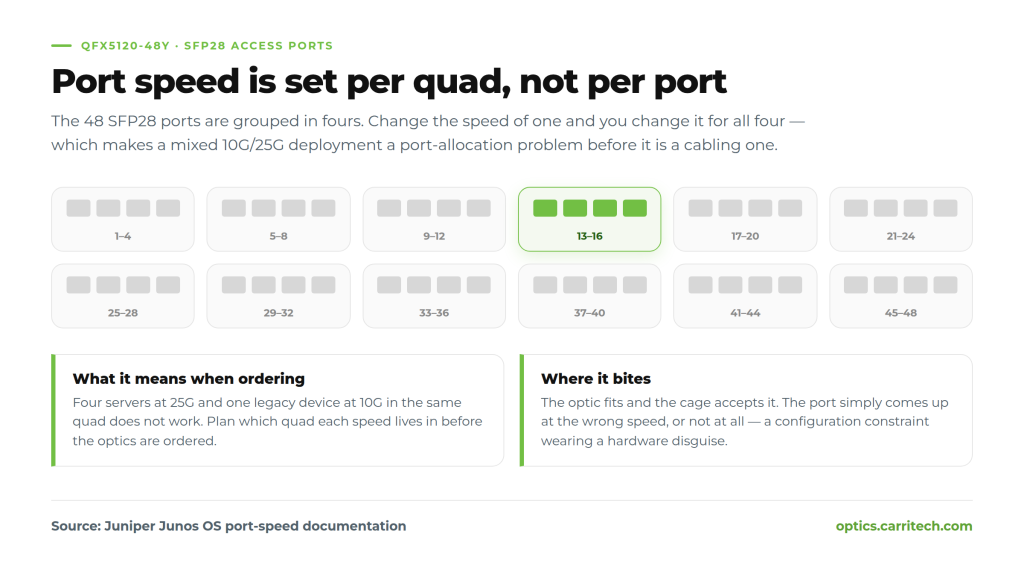
That wording is from Juniper’s port-speed documentation, and it should be read as a purchasing constraint, because that is what it becomes. If you have four servers that need 25G and one legacy device that needs 10G, and they all land in the same quad, you do not have a cabling problem — you have a port-allocation problem that has to be solved before the optics are ordered.
Practically:
- Group your speeds physically. Decide which quads are 25G and which are 10G at design time, and label them. Mixed-speed racks fail this way months after commissioning, when someone patches a new device into the nearest free port.
- Order optics per quad, not per port. If a quad is 25G, four 25G optics. Buying one 10G optic for one port in a 25G quad buys you nothing.
- Leave spare capacity in the slower quads. Legacy 10G devices arrive unannounced far more often than new 25G ones.
The 48Y’s documentation does not state the same quad restriction as explicitly, which in practice means checking your Junos release rather than assuming. Treat the quad rule as the default assumption and be pleasantly surprised.
Trap two: 1G optics and autonegotiation
Not every 1G module is a valid QFX5120 compatible optic, and the reason is negotiation rather than the optic itself. Both the 48Y and 48YM carry the same limitation. Juniper’s wording for the 48Y is that it “does not support autonegotiation when 1-Gbps fiber SFP transceiver is plugged in”; for the 48YM, “does not support autonegotiation when 1-gigabit fiber SFP transceiver is plugged in.” Same rule, two phrasings.
If you are dropping a 1000BASE-SX or 1000BASE-LX module into an SFP28 port to reach an older device, the link will not negotiate its way up. The speed has to be set. This is not a fault, and it is not an optic problem — replacing the module will not fix it, and neither will replacing it with an OEM-branded one.
It is worth saying plainly because it is the most common false RMA on this platform: a 1G optic that appears dead in a 25G-capable port is almost always a configuration state, not a failed part.
Trap three: FEC on the 25G ports
This is the one that costs whole evenings, and it is worth understanding properly rather than as folklore.
Junos supports four forward error correction settings on Ethernet options: fec108 (IEEE 802.3by Clause 108 Reed-Solomon FEC, the 25G one), fec91 (IEEE 802.3bj Clause 91 RS-FEC), fec74, et none — all four are set through the fec statement in the Junos CLI reference. For 25G and 50G interfaces, Juniper documents that “Junos OS software automatically enables or disables 25-Gigabit Ethernet and 50-Gigabit Ethernet for FEC91 based on the type of pluggable optics used.”
Two consequences follow, and the second one is the important one.
First, both ends must agree. Juniper states it directly: “If there is a FEC mismatch, the link between nodes can go down.” A QFX5120 talking to a switch from another vendor across a 25G link is the classic case — two defaults, two different answers, one link that either will not come up or comes up and quietly errors. And on channelised interfaces the setting has to be consistent across the paired channels: configure FEC91 on interface-x/y/z:0 and you must configure it on interface-x/y/z:1 too.
Second — and this is the part that matters when you are choosing optics — Junos decides the FEC behaviour from what the pluggable reports about itself. The module’s EEPROM is an input to a link-layer decision, not just an inventory label. An optic that identifies itself incorrectly does not just show up wrong in show interfaces diagnostics; it can steer the switch into the wrong FEC mode and take the link with it.
That is the strongest technical argument there is for optics coded properly for the platform, and it has nothing to do with brand loyalty. The switch is reading the module and acting on what it reads.
QFX5120 compatible optics, by speed
Every Juniper part number below was checked against Juniper’s Hardware Compatibility Tool, and every standard named is an IEEE 802.3 one unless the text says otherwise.
1G on the SFP28 access ports
For reaching older devices from a 48Y or 48YM. Remember the autonegotiation note above — set the speed explicitly.
| Standard | Atteindre | Juniper part numbers | Carritech equivalent |
|---|---|---|---|
| 1000BASE-SX | 550 m OM2 | SFP-1GE-SX, EX-SFP-1GE-SX-ET, RX-550M-SFP | CT-MSFP-SX-1 |
| 1000BASE-LX | 10 km SMF | SFP-1GE-LX, RX-10KM-SFP | CT-SFP-LX |
| 1000BASE-EX | 40 km SMF | SFP-GE40KM | CT-SFP-EX |
| 1000BASE-ZX | 70 km SMF | SFP-1GE-LH, EX-SFP-1GE-LH, RX-70KM-SFP | CT-SFP-ZX |
| 1000BASE-T | 100 m copper | QFX-SFP-1GE-T, RX-GET-SFP | CT-SFP-T |
| 1000BASE-BX 40 km | 40 km, single fibre | SFP-GE40KT13R15 / SFP-GE40KT15R13 (also EX- prefixed) | CT-SFP-BX-40U / CT-SFP-BX-40D |
10G on the SFP28 access ports
The workhorse tier on this platform, and on the 32C’s pair of SFP+ ports.
| Standard | Atteindre | Juniper part numbers | Carritech equivalent |
|---|---|---|---|
| 10GBASE-SR | 300 m OM3 | QFX-SFP-10GE-SR, SRX-SFP-10GE-SR | CT-SFP+SR |
| 10GBASE-LR | 10 km SMF | QFX-SFP-10GE-LR, SRX-SFP-10GE-LR | CT-SFP+LR |
| 10GBASE-ER | 40 km SMF | QFX-SFP-10GE-ER | CT-SFP+ER |
| 10G tunable DWDM | 80 km | SFPP-10GE-DWDM-IT, SFPP-10G-CT50-ZR | CT-SFP+TDWXX-80 |
A note on 10GBASE-SR reach, because it is the most misquoted figure in the business: 300 m is what IEEE gives you on OM3. On OM4 it is 400 m, and on legacy 62.5 µm plant it is 33 m. The reach is a property of the fibre’s modal bandwidth, not of the optic — we wrote the whole thing up here.
25G on the SFP28 access ports
The reason most people buy a 48Y. Remember: quads, and FEC.
| Standard | Atteindre | Juniper part numbers | Carritech equivalent |
|---|---|---|---|
| 25GBASE-LR | 10 km SMF | JNP-SFP-25G-LR | CT-SFP28-LR |
| 25GBASE-SR | 70 m OM3 / 100 m OM4 | JNP-SFP-25G-SR, SFP-25G-SR-C, SFP-25G-SR-IT, SFP-10G-25G-SR | CT-SFP28-SR |
25GBASE-SR is where the FEC question lives. IEEE 802.3by defines RS-FEC for the 25G short-reach variants, and it is what Junos is choosing between when it reads the module. If you are running 25G to another vendor’s switch, agree the setting on both ends before you commission rather than after.
40G on the QSFP28 uplinks
The QSFP28 cages take QSFP+ modules. This matters if you are connecting a QFX5120 into an existing 40G spine rather than a new 100G one.
| Standard | Atteindre | Juniper part numbers | Carritech equivalent |
|---|---|---|---|
| 40GBASE-SR4 | 150 m OM4 | QSFPP-40GBASE-SR4 | CT-QSFP+SR4 |
| 40GBASE-LR4 | 10 km SMF | QSFPP-40GBASE-LR4, QFX-QSFP-40G-LR4 | CT-QSFP+LR4 |
| 40GBASE-ER4 | 40 km SMF | QSFPP-40GBASE-ER4, JNP-QSFP-40GE-ER4 | CT-QSFP+ER4 |
100G on the QSFP28 uplinks
Eight per 48Y or 48YM, six per 48T, thirty-two on the 32C.
| Standard | Atteindre | Juniper part numbers | Carritech equivalent |
|---|---|---|---|
| 100GBASE-SR4 | 100 m OM4 | QSFP-100GBASE-SR4 | CT-QSFP28-SR4 |
| 100GBASE-LR4 | 10 km SMF | QSFP-100GBASE-LR4 | CT-QSFP28-LR4 |
| 100G CWDM4 | 2 km SMF | platform CWDM4 SKUs | CT-QSFP28-CWDM4 |
| 100GBASE-ER4 | 40 km SMF | — | CT-QSFP28-ER4 |
| 100G BiDi (BXSR) | 100 m OM4, 2 strands | JNP-QSFP-100G-BXSR | CT-Q40/100-SRBD |
The BiDi part is worth a second look if your multimode plant is tight. 100G BiDi runs over two strands rather than the eight an SR4 needs, on the same OM4 you already have. On a retrofit where pulling more fibre is the expensive part, that is often the whole business case.
Breakout: what the uplinks can actually do
Breakout changes which QFX5120 compatible optics make sense, because a channelised port is four links rather than one.
Juniper documents channelisation on the 48Y‘s QSFP28 uplinks as 100G into 4 × 25G et 40G into 4 × 10G.
For the 48YM, the documentation says something narrower and much more important: “Ports 50 and 52 support channelization.” Read that as a restriction, not an addition. On the MACsec model, two of the eight uplinks channelise — not all eight.
If you are designing a 48YM around breakout uplinks, that is the single most expensive assumption you can get wrong, because it is invisible until you try to configure it. Check it against your Junos release before the design is signed off.
The 32C is the interesting one, because every one of its thirty-two ports is channelisable. A 32C is not really a thirty-two port switch; it is up to a hundred and twenty-eight 25G ports in one rack unit, if the fibre and the optics cooperate.
Two things to hold in mind when you design around breakout:
- Breakout consumes fibre, not ports. A 100G port broken out to 4 × 25G needs a fan-out from the MPO or four separate links depending on the optic type. Price the cassettes and trunks in the same business case.
- The FEC and speed rules apply per channel. As above: configure FEC on one channel of a pair and you configure it on both. This is where channelised links most often come up half-working.
Coding: what the switch checks before a QFX5120 compatible optic comes up
Junos identifies a pluggable from its EEPROM: vendor, part number, type, and the optical parameters it reports. A properly coded module presents as the module the platform expects, appears normally in show interfaces diagnostics optics with real DOM readings, and — as covered above — lets the switch make the right FEC decision.
This is not a licensing check or a lockout. It is the switch doing exactly what the standards say it should: reading the module and configuring the link accordingly. Which is precisely why the coding has to be right rather than approximately right.
Every Carritech optic in the tables above is coded for the platform it is going into, tested in real hardware before it ships, and covered by a lifetime warranty. Where a part is used across QFX, EX, MX and SRX with different Juniper SKUs, the coding — not the optical specification — is what differs.
On support
Juniper’s published position is that third-party optics “are ineligible for support, and their use may limit our ability to support and diagnose product issues.” That is a statement about the optics — they did not sell you the module, so they do not support the module — and it is entirely reasonable.
What it is not is a statement that your switch becomes unsupported. In practice, if you raise a case on a link that has a compatible optic in it, expect the first request to be a swap test with an OEM module, which is a sensible diagnostic step rather than a rebuff. We have gone through what Cisco and Juniper actually publish, quoted in full, in a separate piece — and the short version is that your own support agreement is the document that governs, not anybody’s blog.
Keep a couple of OEM modules in the spares kit for exactly that purpose and the conversation is thirty seconds long. It is worth knowing that the optics on your platform will go end-of-sale long before the platform does — we set out how those two clocks run separately here — so the spares question is one you will face whichever route you take.
Check your QFX5120 compatible optics
All of the QFX5120 compatible optics named on this page have a Carritech equivalent you can check in about ten seconds. If you have a build in front of you, put your existing part numbers through the compatibility checker — it takes an OEM part number or a hardware model and gives you the matching part with full specifications.
If you have a whole list rather than one part, send it to us — a BOM, a quote from someone else, or a spreadsheet — and we will come back line by line with the compatible equivalents, the reach and fibre requirements against each one, and a note where the quad or FEC rules above are going to matter.